Model overview, robot lawn mower
Segway Navimow i208 LiDAR: specs, price and who it suits
The i208 LiDAR is the smallest of Segway's LiDAR mowers, meant for medium lawns that trees or buildings keep in shade. It maps the garden with a laser scanner and a camera, so it needs neither a wire nor an antenna.
We may earn a commission when you buy through our links.
By the Mowfriend editorial team Updated How we compare
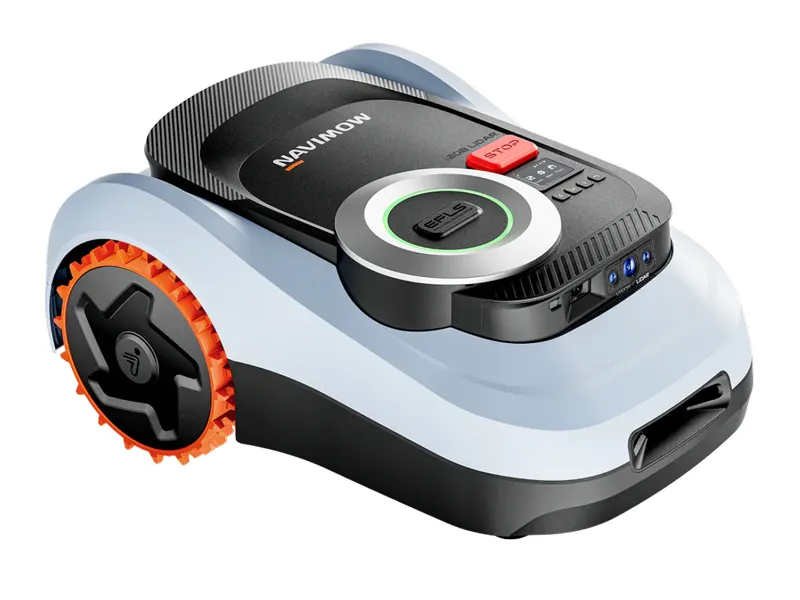
We do not rate this type of product. We compare the specifications instead.
£849£1,099at Segway Navimow UK
Suits you if you
- have a lawn of up to 800 m² shaded by trees, hedges or the house
- want a mower that works without an antenna or a coverage check
- want detailed obstacle detection
Not for you if you
- have a lawn bigger than 800 m²
- have very uneven or slippery ground where all-wheel drive helps
- need to climb more than 45%
Pros
- LiDAR and camera together keep navigation reliable under trees and at night
- Detects more than 200 types of obstacle with 1 cm precision
- Off-road wheels and stability control for stable mowing on 45% slopes
Cons
- Stops at 800 m², so larger lawns need the i215 LiDAR or i220 LiDAR
- Tops out at 45% slope, so very steep banks need a 4WD model
Why choose LiDAR over RTK for a medium lawn?
Because LiDAR does not need the sky. A satellite mower loses accuracy beside tall trees, under a carport or in the shadow of the house. The i208 LiDAR measures distances to fixed objects around it with a laser and pairs that with a camera, so its map holds up in shade and in fading light.
That also means no antenna and no network RTK coverage to check: you unpack it, let it map and it mows. If your lawn is open to the sky, the Navimow i208 AWD is the RTK alternative of the same size.
How does the i208 LiDAR map the garden?
Segway calls it GeoSketch: the mower combines its laser scan with camera images into a real-scene map that you see in full colour in the app. You can let it map automatically or steer the outline by hand, then adjust zones, no-go areas and the channels between lawns.
When you dig a new bed or move a path, you redraw that part of the map in the app. Nothing in the garden has to move.
How well does the i208 LiDAR detect obstacles?
Segway says the i2 LiDAR models recognise more than 200 types of obstacle and place them to within 1 cm. That is a step up from the 150 or so on the i1 models, and useful in a family garden where toys, hoses and chairs move about.
Off-road wheels and electronic stability control keep it steady on slopes up to 45% (24°). It does not have all-wheel drive, though, so on a soft, rolling lawn the AWD version grips better.
Which i2 LiDAR size do you need?
Measure every lawn and add them together. Up to 800 m² the i208 LiDAR is enough. Between 800 and 1,500 m², step up to the Navimow i215 LiDAR, and for up to 2,000 m² to the Navimow i220 LiDAR.
The 21 cm cut, the 30 to 60 mm height range and the 59 dB(A) noise level are identical on all three, so the choice is purely about coverage. Every LiDAR model we compare, including the Dreame A1 Pro, is on LiDAR robot mowers.
Specifications
| Navigation | 3D LiDAR + camera, no boundary wire |
|---|---|
| Lawn area | up to 800 m² |
| Max slope | up to 45% |
| Cutting height | 30 to 60 mm |
| Cutting width | 21 cm |
| Noise | 59 dB(A) |
The specifications come from the manufacturer: uk.navimow.com, uknavimow.com.
Common questions
Does the i208 LiDAR need an antenna or network RTK?
Neither. It finds its position with the 3D LiDAR scanner and camera, so you can set it up without checking satellite reception or network coverage.
Can the i208 LiDAR mow at night?
Segway says LiDAR and camera together keep it navigating under trees and at night. For wildlife, though, daytime mowing is the kinder choice, since hedgehogs are out after dark.
Does the i208 LiDAR have 4G?
Yes. Segway includes a year of 4G data for remote app control, out-of-boundary alerts and GPS tracking, which you can renew in the app.
About this overview. This overview is based on information from the shop and the manufacturer. We have not used the mower ourselves and make no claims about features we cannot back up. Our method is set out on the How we compare page.